1M Clicks to Escape Guide & Time Calculator
Locked in a white room with a big red button? In this Roblox game by Click Dat Button, your escape goal is 1,000,000 clicks. Learn the basic loop, find the in-game auto clicker information and estimate your remaining time below.
Play 1M Clicks to Escape on Roblox ↗Official game description checked November 2, 2026. This is an independent guide; Toon Tone has not tested the current game in Roblox.
1 million clicks: time calculator
How long until you escape? Enter your current game counter and how much it increases per second. The target is 1,000,000 clicks.
Measure the increase in your in-game counter over 10 seconds, then divide by 10. This includes any upgrades, auto clicker or shared progress already reflected in your counter; use this rate instead of your physical mouse clicks per second.
Estimated time remaining2 days 7 hours 33 minutes 20 seconds
1,000,000 clicks remaining
Estimate assumes a constant rate, with no breaks or future upgrades. This calculator does not connect to Roblox or save your inputs.
How to play 1M Clicks to Escape
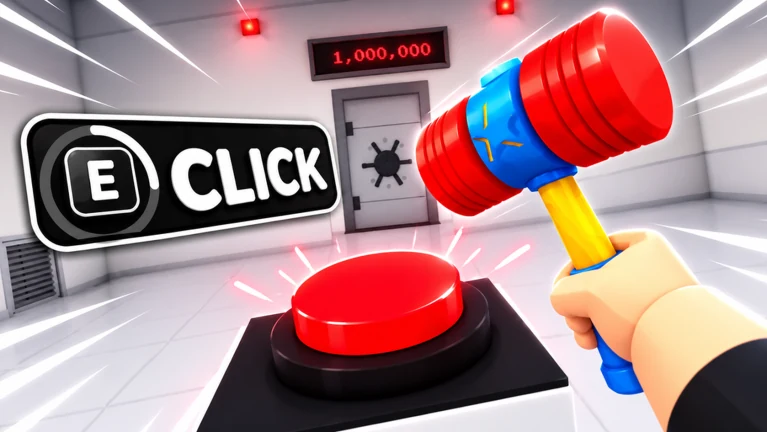
The developer describes a game-show setup: you are locked in a white room and need to click the big red button 1,000,000 times to escape. Along the way you can unlock items, uncover lore, and earn gems to spend on upgrades.
- Open the official Roblox experience above and start a run. Use the game counter to track your progress toward one million.
- Click the red button and watch how your counter and gem balance change. The controls and menus in your current build are the reference.
- Read the available upgrade descriptions before spending gems. Compare progress over the same short interval before and after a purchase.
- If playing together, the developer says you can get locked in with up to three friends and escape together. Check how the counter behaves in your session.
- Use the time calculator with your measured rate, and measure again whenever your setup changes.
The official listing confirms the basic loop, but does not give a complete upgrade table or ending walkthrough. Exact upgrade costs, the best purchase order, and what happens after the escape threshold have not been verified here.
Tips for faster progress
Check the developer’s free auto clicker offer
The official description advertises a free auto clicker for joining the developer’s Roblox community. Check that offer in the current game; the claim steps and click rate are not established by the description.
Compare upgrades with a short measurement
Gems can be spent on upgrades. Measure your game counter for 10 seconds before an upgrade, then repeat afterward under the same conditions. Compare the increase with the gem cost to choose your next purchase. No universal best upgrade order or guaranteed multiplier has been verified.
Try a session with friends
The developer supports playing with up to three friends. If your displayed progress changes when you team up, measure that new rate for the calculator. Do not assume that four players always means four times the progress.
Recalculate after changing your setup
Upgrades, tools and auto clicking may change the rate visible in your game counter. Use the observed increase per second rather than applying an extra multiplier in the calculator. Breaks and time spent in menus will make the actual session longer.
How to find the in-game auto clicker
The developer’s official game description offers a free auto clicker for joining Click Dat Button on Roblox.
Open that official community and review the current instructions in the experience or developer announcements. The source does not specify which menu activates the reward, whether rejoining is required, or how fast it clicks; those details remain unverified.
This guide covers the game’s own advertised feature. It does not require downloading an external auto clicker or running a Roblox Lua script.
Find walkthrough videos and community help
Search walkthrough videos on YouTube ↗ for the exact game name plus Roblox guide. This opens search results, not a video selected or verified by Toon Tone. No specific walkthrough video has been verified for this page.
Check the video’s upload date, game title and visible interface against your current session. Older footage may show different upgrades or a different chapter. Ending videos may contain spoilers.
For developer announcements and community discussion, visit the official Click Dat Button community or follow the social links on the Roblox game page.
1M Clicks to Escape questions
How long does one million clicks take?
At a constant five progress points per second, starting from zero, the estimate is 2 days 7 hours 33 minutes 20 seconds of continuous progress. This is an arithmetic example, not a measured game completion time. Enter your actual game progress and rate in the calculator.
Does the calculator click for me or track my Roblox account?
No. It estimates time from the two numbers you enter. It does not click in Roblox, read your game session or store your inputs; reloading restores the defaults.
Can I escape with friends?
The official description says you can get locked in with up to three friends and escape together. It does not establish a fixed team multiplier or explain how progress is shared.
Is there a free auto clicker?
The developer advertises one for joining its Roblox community. Check the current game for the claim and activation steps. Toon Tone has not verified those steps or its speed.
What happens at one million clicks?
The listing presents one million clicks as the escape goal. The ending sequence, chapter transitions and any later goals have not been verified here. Reaching the target in this calculator only means the entered counter has reached one million.
Sources and verification notes
Official Roblox experience · Roblox public game data and developer description · Click Dat Button community.
Source review: November 2, 2026. Roblox’s public game data identifies place 138666683767450, universe 10770306793 and creator Click Dat Button (community 478784895). The description supports the million-click objective, gems and upgrades, items, lore, up to three friends and the community auto clicker offer.
Gameplay, reward activation, upgrade prices and ending details have not been tested by Toon Tone. Tips about comparing rates are suggestions, and calculator results are estimates. We review this guide manually; the source check date is not a live game-status check.
Independent fan guide by Toon Tone; not affiliated with Roblox or Click Dat Button.
More Roblox guides: Shibuya beta codes and Practical Basketball codes.